Tuesday, December 23, 2008
Introduction to SVG
* SVG stands for Scalable Vector Graphics
* SVG is used to define vector-based graphics for the Web
* SVG defines the graphics in XML format
* SVG graphics do NOT lose any quality if they are zoomed or resized
* Every element and every attribute in SVG files can be animated
* SVG is a W3C recommendation
* SVG integrates with other W3C standards such as the DOM and XSL
SVG is a W3C Recommendation
SVG became a W3C Recommendation 14. January 2003.
To read more about the SVG activities at W3C, please read our W3C tutorial.
SVG History & Advantages
Sun Microsystems, Adobe, Apple, IBM, and Kodak are some of the organizations that have been involved in defining SVG.
Advantages of using SVG over other image formats (like JPEG and GIF) are:
* SVG files can be read and modified by a large range of tools (e.g. notepad)
* SVG files are smaller and more compressible than JPEG and GIF images
* SVG images are scalable
* SVG images can be printed with high quality at any resolution
* SVG images are zoomable (and the image can be zoomed without degradation)
* Text in SVG is selectable and searchable (excellent for making maps)
* SVG works with Java technology
* SVG is an open standard
* SVG files are pure XML
The main competitor to SVG is Flash.
The biggest advantage SVG has over Flash is the compliance with other standards (e.g. XSL and the DOM). Flash relies on proprietary technology that is not open source.
Look at a directory of SVG enabled software and services.
Viewing SVG Files
If your browser does not support SVG files, you will need to download an SVG viewer to view SVG files.
Download a FREE SVG Viewer from Adobe.
Note: Firefox 1.5+, Opera 9+, and Google Chrome have native SVG support. If you are using one of these browsers, you do not need to install an SVG viewer.

Thursday, December 18, 2008
Useful points in web designing
scrollamount="4" direction="left" onMouseover="this.scrollAmount=0" onMouseout="this.scrollAmount=4"
How to Run Firefox 2 and Firefox 3 Simultaneously
With Firefox 3 finally released, it is time to upgrade and enjoy the new features and the performance increase it offers. But, the truth is we have learnt to trust our current profile in Firefox 2 and naturally you’d be leery of upgrading to Firefox 3. For good reasons. There are still some extensions that haven’t been updated for Firefox 3.
But, with all the hype that’s going on with Firefox 3 (I am guilty of that too  ) and if you are curious to play with it without messing your current Firefox 2 setup, here is how you do it.
What are Profiles?
A profile in Firefox stores your set of preferences, settings, bookmarks, passwords, extensions, themes, etc. If you and your partner share a computer at home, you could have a profile for each of you. Your better half wouldn’t have to go through your bookmarks or put up with the dark theme you love or necessarily like all the GreaseMonkey scripts you use.
Or, if you are like me you might use a profile loaded with all the webmaster extensions to get down and dirty and use a lightning fast profile stripped of most of the extensions for casual browsing.
Setup a Test Profile
Setting up a test profile is very easy.
- Run this from the MS DOS command prompt:

firefox.exe -profilemanager - Click on ‘Create Profile’ and name it as you wish, for e.g., playbox
- Uncheck the ‘Don’t ask at startup’ if you wish to choose the profile every time you start Firefox. (if not I will show you how to create one click shortcuts for every profile you have)
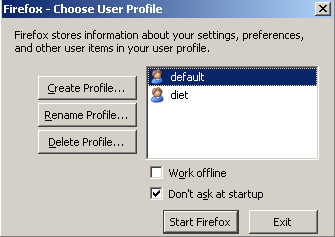
- If you don’t want to choose your profile every time, just create a new shortcut for Firefox with the Target in Properties looking like
C:\Program Files\Mozilla Firefox\firefox.exe -p playbox
(substitute ‘playbox’ with the name of your profile) and name it something like ‘Firefox Mean‘ and ‘Firefox Lean‘. - You can also delete any old profiles right from here.
Tools you need
You will need these 2 Firefox extensions to perform backup of your extensions and package them into a single extension file.
- Install FEBE - Firefox Environment Backup Extension Firefox extension is used to create backups of everything about your Firefox profile - the whole profile or custom parts of your profile. You can also schedule daily backups so you never lose your settings or extensions or profiles.
- Install CLEO - Compact Library Extension Organizer Firefox extension helps packaging your desired extensions backed up using FEBE into a one single installable extension (.xpi) file.
It’s Time to Backup
It doesn’t matter if you use multiple profiles or not, it is always a good idea to backup Firefox environment with FEBE. FEBE backups are very customizable. 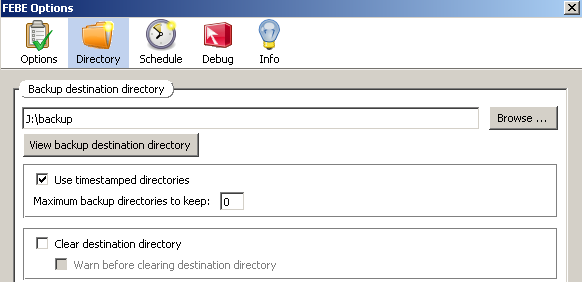
- Open Tools -> FEBE -> FEBE Options in Firefox and choose either ‘Selective’ or ‘Full Profile’ option.
- Choose the directory you want to backup to. I recommend using ‘timestamped directories’ as this might help you troubleshoot if you have problems due to new extensions or any customizations you might be doing.
- Schedule your daily backup or you could use the ‘Perform Backup’ from FEBE menu.
Rollin’ Rollin’ Rollin’
You can individually ‘Restore’ extensions from your backup directory using FEBE to a different profile. But, using CLEO you can create a custom .xpi file with extensions you choose from your backup destination and install in a different profile or even a different computer in one shot. This is a great way to keep your Firefox extensions the same across your laptop, desktop and work computers.
- Open Tools -> FEBE -> CLEO -> CLEO Options in Firefox menu and set the destination directory for your cleopack (installable .xpi file).
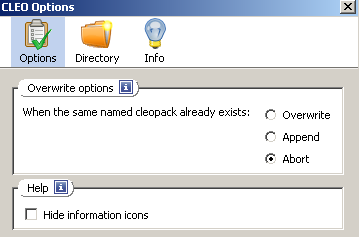
- Choose ‘Create cleopack’ and enter a name.
- Use ‘Select items to package’ to pick and choose the extensions you want to package.
- Hit ‘Create cleopack’ .
Duplicate your Extensions
We are almost done! I promise.
- Open up the new profile and go to File -> Open File and browse to the ‘cleopack’ you created with CLEO. (or hit Ctrl-O)
- Accept to install the extension.
- Restart Firefox and you are done!
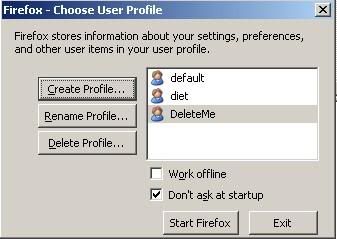
- Create a New Profile: You can create a profile exclusively for Firefox 3 in your Firefox 2 Profile Manager. Name it something like DeleteMe so you know you are just testing it.
From your command prompt,
c:\Program Files\Mozilla Firefox\firefox.exe -ProfileManager ( for Windows) - Download Firefox 3: Download the latest Firefox 3.
- Install Firefox 3: You have choose a different installation folder than the default one as choosing the default will overwrite your current Firefox 2! You could also choose to get the Portable Firefox 3.
- Start Firefox 3: Start Firefox 3 with the new DeleteMe profile you created. The key here is the ‘-no-remote’ parameter as it makes Firefox start a second Firefox.exe process with the new profile

From your command prompt,
d:\firefox3\firefox\firefox.exe -P DeleteMe -no-remote
( for Windows - I unzipped the Firefox 3 nightly build to D:\firefox3 directory)
You could also create a Desktop Shortcut and change the property of the shortcut to look like in the Picture below so you don’t have to type it all in every time.
You could run your Firefox 2 simultaneously with Firefox 3 because they are both using different Profiles.
Now that I have Firefox 2 & Firefox 3 simultaneously, you can safely try it out and see which extensions work and which don’t before actually making the switch.
How to Debug script in Chrome
Commands while page is running (no breakpoints hit)
break [condition]
Set a break point where the location is
break_info [breakpoint #]
List the current breakpoints [or the details of the breakpoint that is specified]
clear
Remove a specified breakpoint
help [command]
Display the help information for the current status [or the specified command]
Output the expression specified which can be string, object, function, variable, etc.
scripts
List all of the scripts attached to the page.
Commands while page is paused in debugging mode (Break point is hit)
args
Summerize the arguments to the current function. Does not display anything if there are no arguments.
break [condition]
See Running Description
break_info [breakpoint #]
See Running Description
backtrace [
Look at all the current frames [or look at the frames specified in the range.]* Looks like you need to specify both. Changed notation here compared to the help in the debugger *
clear
See Running Description
continue
Continues the execution of the script.
frame [frame #]
Shows the current frame [or shows the specified frame]
help
See Running Description
locals
Summarize the local variables for current frame. Displays the variables and their values.
next
Moves to the next line in the code. Seems to be like step.
See Running Description
scripts
See Running Description
source [from line] | [
Show the current functions source code [or see a specified line or range of lines]
step
Step through the code line by line when paused in debug mode. * Not sure what is different between step and next *
stepout
* Seems to not work! Should step out of the current debugging step. It should work like continue! *
Steps to import SSL certificate:
2. Type in MMC and click OK.
3. Go into the File--> select Add/Remove Snap-in.
4. Click on Add --> Double Click on Certificates -->and click on Add --> Select Computer Account --> Select Local Computer -->OK.
5. Click the + to Expand the Certificates Consol Tree.
6. Right click on the Personal Certificates Store (folder).
7. Choose --> ALL TASKS --> Import.
8. Follow the Certificate Import Wizard to import your Primary Certificate from the .pfx file(ssl123.pfx). When prompted, choose to "Automatically place the certificates in the certificate stores" based on the type of the certificate.
9. Close the MMC console. In the case that you are prompted, it is not necessary to save the changes made to the MMC console.
10.In your IIS manager, right-click on the "Default Web Site" that you would like to use the certificate and select properties.
11.Click on the "Directory Security Tab" and hit the "Server Certificate" Button. This will start the server certificate wizard.
12.If you are asked what you want to do with the current certificate on the site, choose to remove it, finish the wizard, and click the server certificate button to run the wizard again.
13. Choose to 'Assign an existing certificate' to the site and choose the new certificate that you just imported.
16. Finish the certificate wizard.
17. Restart the server.
About Web.Config
Web.config file, as it sounds like is a configuration file for the Asp .net web application. An Asp .net application has one web.config file which keeps the configurations required for the corresponding application. Web.config file is written in XML with specific tags having specific meanings.
There are number of important settings that can be stored in the configuration file. Here are some of the most frequently used configurations, stored conveniently inside Web.config file..
- Database connections
- Session States
- Error Handling
- Security
Authentication:- For setting our web application authentication insidetag. There are four different type of authentication “None”, “Windows”, “Forms”, “Passport”. . <authentication mode="None"/> Basically we are using Windows authentication as a default authentication. This authentication is handled by Internet Information Server(IIS). This provider uses IIS to perform the authentication and then passes the authenticated identity to your code. <authentication mode="Windows"/>
If you do not require any authentication, then use “None” inside modeIIS gives you a choice for four different authentication methods: Anonymous, basic, digest, and windows integrated
If user select anonymous authentication, IIS doesn’t perform any authentication on that web application.
If user select basic authentication, users must provide a windows username and password to connect. How ever this information is sent over the network in clear text, which makes basic authentication very much insecure over the internet.
If user select digest authentication, users must still provide a windows user name and password to connect. This information requires that all users be running Internet Explorer 5 or later and that windows account to stored in active directory.
If you select windows integrated authentication, passwords never cross the network. Users must still have a username and password, but the application uses either the Kerberos or challenge/response protocols authenticate the user.
Forms authentication uses web application forms to collect the user credential and on the basis of his credential, it takes action on web application
<authentication mode="Form">
<Form name="Form" LoginUrl = “index.aspx”>
authentication> Passport authentication is provided by the Microsoft. RedirectUrl specifies the page to redirect to if the page requires authentication and the user has not signed on with passport. <authentication mode="Passport">
<passport redirectUrl="internal"/>
authentication>Passport authentication uses an encryption mechanism to indicate that login user is valid user or not. If user successfully login then it is a valid user otherwise is will be redirected back to your site mentioned in redirectUrl attribute tag.
For using Passport authentication, you first install Passport Software Development Kit (SDK) on your server. The SDK can be found at http://msdn.microdoft.com/library/default.asp?url=/downloads/list/websrvpass.aps.It includes full details of implementing passport authentication in your own applications.
Authorization:- The
<authorization>tag controls client access to web pages resources. This element can be declared at any level (machine, site, application, subdirectory, or page).
<allow users="comma-separated list of users"
roles="comma-separated list of roles"
verbs="comma-separated list of verbs"/>
<deny users="comma-separated list of users"
roles="comma-separated list of roles"
verbs="comma-separated list of verbs"/>
authorization>
tag access to a resource based on the following:
users attribute: A comma-separated list of user names that are granted access to the resource. A question mark (?) allows anonymous users; an asterisk (*) allows all users.
roles attribute: A comma-separated list of roles that are granted access to the resource.
verbs attribute: A comma-separated list of HTTP transmission methods that are granted access to the resource. Verbs registered to ASP.NET are GET, HEAD, POST, and DEBUG.
tag access to a resource based on the following:
users: A comma-separated list of user names that are denied access to the resource. A question mark (?) indicates that anonymous users are denied access; an asterisk (*) indicates that all users are denied access.
roles: A comma-separated list of roles that are denied access to the resource.
verbs: A comma-separated list of HTTP transmission methods that are denied access to the resource. Verbs registered to ASP.NET are GET, HEAD, POST, and DEBUG.
CustomErrors:- This tag contain the information about the custom error setting. In case any error is coming to your web application then it is redirected to defaultRedirect Url. For enabling and disabling custom error, we specify value inside mode attribute.
<customErrors defaultRedirect="url" mode="On|Off|RemoteOnly">
<error statusCode="statuscode" redirect="url"/>
customErrors>“On” indicate then custom error setting is on. In case of error, it will redirected to default url.
“Off” specify that custom error is disable.
“RemoteOnly” specifies that custom errors are shown only to remote clientsCompilation:- Set compilation debug="true" to enable ASPX debugging. Otherwise, setting this value to false will improve runtime performance of this application. Set compilation debug="true" to insert debugging symbols (.pdb information) into the compiled page. Because this creates a larger file that executes more slowly, you should set this value to true only when debugging and to false at all other times. For more information, refer to the documentation about debugging ASP.NET files.
<compilation defaultLanguage="c#" debug="true" />Trace:- It is used for tracing of execution of your web application. There are two level of tracing, individual page level and application Application-level tracing enables trace log output for every page within an application. Set trace enabled="true" to enable application trace logging. If pageOutput="true", the trace information will be displayed at the bottom of each page. Otherwise, you can view the
application trace log by browsing the "trace.axd" page from your web application root.For setting for application level trace, we put this code inside web.config file.
<trace
enabled="false"
requestLimit="10"
pageOutput="false"
traceMode="SortByTime"
localOnly="true"
/>And for page level tracing, we put trace=”true” inside aspx page.
<%@ Page language="c#" Codebehind="EmployDetails.aspx.cs" AutoEventWireup="false" Inherits="Salary.Employ" Trace=”True” %>
Identity:- This tag control the identity of web application. Impersonation is disabled by default. When using impersonation, ASP.NET applications can optionally execute with the identity of the client on whose behalf they are operating
<identity impersonate="true|false" userName="domain\username" password="password"/>
You can programmatically read the identity of the impersonated user, as shown in the following example.
[Visual Basic]
Dim username As String = System.Security.Principal.WindowsIdentity.GetCurrent().Name
[C#]
String username = System.Security.Principal.WindowsIdentity.GetCurrent().Name;SessionState:- SessionState is used for specify which option you choose for storing the session for your web application. There are four mode option regarding session state.
“Off” Indicates that session state is not enabled.
<sessionState mode="Off|InProc|StateServer|SQLServer"
“InProc” Indicates that session state is stored locally. Web application in this mode run faster as compared to other session state mode. But problem is that if IIS restart then loss of session data take place.
“StateServer” Indicates that session state is stored on a remote server.
“SQLServer” Indicates that session state is stored on the SQL Server. For this you first run the InstallSQLState.sql script on the SQL Server. The advantage of SQL Server session state is that we can share session state among the different processors in the web garden or Web farm. And disadvantage is slow as compared to InProc mode.
“Cookieless = true” specifies that session is without cookieless should used. And false is the reverse of that.
“Timeout” specifies that session is activated for how much time, if not hit is coming within that time periods then session is expired.
“stateConnectionString” require when you specify mode = StateServer.
“sqlConnectionString” attribute store the connection string of database. And we specify mode = SQLServer.
“stateNetworkTimeout” attribute using StateServer mode to store session state, specifies the number of seconds the TCP/IP network connection between the Web server and the state server can be idle before the session is abandoned. The default is 10.
cookieless="true|false"
timeout="number of minutes"
stateConnectionString="tcpip=server:port"
sqlConnectionString="sql connection string"
stateNetworkTimeout="number of seconds"/>Globilization:- This section sets the globalization settings of the application.
<globalization
requestEncoding="utf-8"
responseEncoding="utf-8"
/>appSettings:- The
>element stores custom application configuration information such as database connection strings, file paths, XML Web service URLs, or any information stored in an application's .ini file. The key/value pairs specified in the element can be accessed in code using the System.Configuration.ConfigurationSettings class.
<appSettings>
<add key="EmailFrom" value="rajshekhar@gmail.com" />
<add key="cssFile" value="CSS/text.css"/>
<add key="jsFilePath" value="JavaScript/MenuFunctions.js"/>
appSettingsFor accessing the value of appSettings is
strEmail = System.Configuration.ConfigurationSettings.AppSettings[“EmailFrom”];

Labels: configration file in asp.net, Web.Config
C# Interview Q &A
- Does C# support multiple-inheritance?
No.
- Who is a protected class-level variable available to?
It is available to any sub-class (a class inheriting this class).
- Are private class-level variables inherited?
Yes, but they are not accessible. Although they are not visible or accessible via the class interface, they are inherited.
- Describe the accessibility modifier “protected internal”.
It is available to classes that are within the same assembly and derived from the specified base class.
- What’s the top .NET class that everything is derived from?
System.Object.
- What does the term immutable mean?
The data value may not be changed. Note: The variable value may be changed, but the original immutable data value was discarded and a new data value was created in memory.
- What’s the difference between System.String and System.Text.StringBuilder classes?
System.String is immutable. System.StringBuilder was designed with the purpose of having a mutable string where a variety of operations can be performed.
- What’s the advantage of using System.Text.StringBuilder over System.String?
StringBuilder is more efficient in cases where there is a large amount of string manipulation. Strings are immutable, so each time a string is changed, a new instance in memory is created.
- Can you store multiple data types in System.Array?
No.
- What’s the difference between the System.Array.CopyTo() and System.Array.Clone()?
The Clone() method returns a new array (a shallow copy) object containing all the elements in the original array. The CopyTo() method copies the elements into another existing array. Both perform a shallow copy. A shallow copy means the contents (each array element) contains references to the same object as the elements in the original array. A deep copy (which neither of these methods performs) would create a new instance of each element's object, resulting in a different, yet identacle object.
- How can you sort the elements of the array in descending order?
By calling Sort() and then Reverse() methods.
- What’s the .NET collection class that allows an element to be accessed using a unique key?
HashTable.
- What class is underneath the SortedList class?
A sorted HashTable.
- Will the finally block get executed if an exception has not occurred?
Yes.
- What’s the C# syntax to catch any possible exception?
A catch block that catches the exception of type System.Exception. You can also omit the parameter data type in this case and just write catch {}.
- Can multiple catch blocks be executed for a single try statement?
No. Once the proper catch block processed, control is transferred to the finally block (if there are any).
- Explain the three services model commonly know as a three-tier application.
Presentation (UI), Business (logic and underlying code) and Data (from storage or other sources).
Class Questions
- What is the syntax to inherit from a class in C#?
Place a colon and then the name of the base class.
Example: class MyNewClass : MyBaseClass
- Can you prevent your class from being inherited by another class?
Yes. The keyword “sealed” will prevent the class from being inherited.
- Can you allow a class to be inherited, but prevent the method from being over-ridden?
Yes. Just leave the class public and make the method sealed.
- What’s an abstract class?
A class that cannot be instantiated. An abstract class is a class that must be inherited and have the methods overridden. An abstract class is essentially a blueprint for a class without any implementation.
- When do you absolutely have to declare a class as abstract?
1. When the class itself is inherited from an abstract class, but not all base abstract methods have been overridden.
2. When at least one of the methods in the class is abstract.
- What is an interface class?
Interfaces, like classes, define a set of properties, methods, and events. But unlike classes, interfaces do not provide implementation. They are implemented by classes, and defined as separate entities from classes.
- Why can’t you specify the accessibility modifier for methods inside the interface?
They all must be public, and are therefore public by default.
- Can you inherit multiple interfaces?
Yes. .NET does support multiple interfaces.
- What happens if you inherit multiple interfaces and they have conflicting method names?
It’s up to you to implement the method inside your own class, so implementation is left entirely up to you. This might cause a problem on a higher-level scale if similarly named methods from different interfaces expect different data, but as far as compiler cares you’re okay.
To Do: Investigate
- What’s the difference between an interface and abstract class?
In an interface class, all methods are abstract - there is no implementation. In an abstract class some methods can be concrete. In an interface class, no accessibility modifiers are allowed. An abstract class may have accessibility modifiers.
- What is the difference between a Struct and a Class?
Structs are value-type variables and are thus saved on the stack, additional overhead but faster retrieval. Another difference is that structs cannot inherit.
Method and Property Questions
- What’s the implicit name of the parameter that gets passed into the set method/property of a class?
Value. The data type of the value parameter is defined by whatever data type the property is declared as.
- What does the keyword “virtual” declare for a method or property?
The method or property can be overridden.
- How is method overriding different from method overloading?
When overriding a method, you change the behavior of the method for the derived class. Overloading a method simply involves having another method with the same name within the class.
- Can you declare an override method to be static if the original method is not static?
No. The signature of the virtual method must remain the same. (Note: Only the keyword virtual is changed to keyword override)
- What are the different ways a method can be overloaded?
Different parameter data types, different number of parameters, different order of parameters.
- If a base class has a number of overloaded constructors, and an inheriting class has a number of overloaded constructors; can you enforce a call from an inherited constructor to a specific base constructor?
Yes, just place a colon, and then keyword base (parameter list to invoke the appropriate constructor) in the overloaded constructor definition inside the inherited class.
Events and Delegates
- What’s a delegate?
A delegate object encapsulates a reference to a method.
- What’s a multicast delegate?
A delegate that has multiple handlers assigned to it. Each assigned handler (method) is called.
XML Documentation Questions
- Is XML case-sensitive?
Yes.
- What’s the difference between // comments, /* */ comments and /// comments?
Single-line comments, multi-line comments, and XML documentation comments.
- How do you generate documentation from the C# file commented properly with a command-line compiler?
Compile it with the /doc switch.
Debugging and Testing Questions
- What debugging tools come with the .NET SDK?
1. CorDBG – command-line debugger. To use CorDbg, you must compile the original C# file using the /debug switch.
2. DbgCLR – graphic debugger. Visual Studio .NET uses the DbgCLR.
- What does assert() method do?
In debug compilation, assert takes in a Boolean condition as a parameter, and shows the error dialog if the condition is false. The program proceeds without any interruption if the condition is true.
- What’s the difference between the Debug class and Trace class?
Documentation looks the same. Use Debug class for debug builds, use Trace class for both debug and release builds.
- Why are there five tracing levels in System.Diagnostics.TraceSwitcher?
The tracing dumps can be quite verbose. For applications that are constantly running you run the risk of overloading the machine and the hard drive. Five levels range from None to Verbose, allowing you to fine-tune the tracing activities.
- Where is the output of TextWriterTraceListener redirected?
To the Console or a text file depending on the parameter passed to the constructor.
- How do you debug an ASP.NET Web application?
Attach the aspnet_wp.exe process to the DbgClr debugger.
- What are three test cases you should go through in unit testing?
1. Positive test cases (correct data, correct output).
2. Negative test cases (broken or missing data, proper handling).
3. Exception test cases (exceptions are thrown and caught properly).
- Can you change the value of a variable while debugging a C# application?
Yes. If you are debugging via Visual Studio.NET, just go to Immediate window.
ADO.NET and Database Questions
- What is the role of the DataReader class in ADO.NET connections?
It returns a read-only, forward-only rowset from the data source. A DataReader provides fast access when a forward-only sequential read is needed. - What are advantages and disadvantages of Microsoft-provided data provider classes in ADO.NET?
SQLServer.NET data provider is high-speed and robust, but requires SQL Server license purchased from Microsoft. OLE-DB.NET is universal for accessing other sources, like Oracle, DB2, Microsoft Access and Informix. OLE-DB.NET is a .NET layer on top of the OLE layer, so it’s not as fastest and efficient as SqlServer.NET.
- What is the wildcard character in SQL?
Let’s say you want to query database with LIKE for all employees whose name starts with
- Explain ACID rule of thumb for transactions.
A transaction must be:
1. Atomic - it is one unit of work and does not dependent on previous and following transactions.
2. Consistent - data is either committed or roll back, no “in-between” case where something has been updated and something hasn’t.
3. Isolated - no transaction sees the intermediate results of the current transaction).
4. Durable - the values persist if the data had been committed even if the system crashes right after.
- What connections does Microsoft SQL Server support?
Windows Authentication (via Active Directory) and SQL Server authentication (via Microsoft SQL Server username and password).
- Between Windows Authentication and SQL Server Authentication, which one is trusted and which one is untrusted?
Windows Authentication is trusted because the username and password are checked with the Active Directory, the SQL Server authentication is untrusted, since SQL Server is the only verifier participating in the transaction.
- What does the Initial Catalog parameter define in the connection string?
The database name to connect to.
- What does the Dispose method do with the connection object?
Deletes it from the memory.
To Do: answer better. The current answer is not entirely correct.
- What is a pre-requisite for connection pooling?
Multiple processes must agree that they will share the same connection, where every parameter is the same, including the security settings. The connection string must be identical.
Assembly Questions
- How is the DLL Hell problem solved in .NET?
Assembly versioning allows the application to specify not only the library it needs to run (which was available under Win32), but also the version of the assembly.
- What are the ways to deploy an assembly?
An MSI installer, a CAB archive, and XCOPY command.
- What is a satellite assembly?
When you write a multilingual or multi-cultural application in .NET, and want to distribute the core application separately from the localized modules, the localized assemblies that modify the core application are called satellite assemblies.
- What namespaces are necessary to create a localized application?
System.Globalization and System.Resources.
- What is the smallest unit of execution in .NET?
an Assembly.
- When should you call the garbage collector in .NET?
As a good rule, you should not call the garbage collector. However, you could call the garbage collector when you are done using a large object (or set of objects) to force the garbage collector to dispose of those very large objects from memory. However, this is usually not a good practice.
- How do you convert a value-type to a reference-type?
Use Boxing.
- What happens in memory when you Box and Unbox a value-type?
Boxing converts a value-type to a reference-type, thus storing the object on the heap. Unboxing converts a reference-type to a value-type, thus storing the value on the stack.
Monday, December 15, 2008
About CAPTCHA
Many hackers attack Web sites by brute force attempting to try the ID and password via programs or automation software. As a definition found in Wikipedia, CAPTCHA is a type of challenge-response test to ensure the user is human. The term CAPTCHA was coined in 2000 by Luis von Ahn, Manuel Blum, Nicholas J. Hopper (all of Carnegie Mellon University), and John Langford (then of IBM). A common type of CAPTCHA requires that the user type the letters or numbers of a distorted image, sometimes with the addition of an obscured sequence of letters or digits that appears on the screen. This technology can reduce the risk of your authentication scheme or customer registration system from being subjected to an automated denial of service operation (whether a legal or illegal operation).
Changing the default browser used in VS 2005 and Visual Web Developer
1) Right click on a .aspx page in your solution explorer
2) Select the "browse with" context menu option
3) In the dialog you can select or add a browser. If you want Firefox in the list, click "add" and point to the firefox.exe filename
4) Click the "Set as Default" button to make this the default browser when you run any page on the site.
Note that there is also an optional drop-down at the bottom of the dialog that lets you select the default browser window size when loading. You can choose 800x600 or 1024x768 if you want to visualize what the site will look like for people using those screen resolutions. This works for both IE and FireFox (and probably other browsers too -- those just happened to be the two I checked).
Thursday, December 4, 2008
Introduction to Web Services
Web Services are published, found, and used through the Web.
What are Web Services?
- Web services are application components
- Web services communicate using open protocols
- Web services are self-contained and self-describing
- Web services can be discovered using UDDI
- Web services can be used by other applications
- XML is the basis for Web services
How Does it Work?
The basic Web services platform is XML + HTTP.
The HTTP protocol is the most used Internet protocol.
XML provides a language which can be used between different platforms and programming languages and still express complex messages and functions.
Web services platform elements:
- SOAP (Simple Object Access Protocol)
- UDDI (Universal Description, Discovery and Integration)
- WSDL (Web Services Description Language)
Why Web Services?
Interoperability has Highest Priority
When all major platforms could access the Web using Web browsers, different platforms could interact. For these platforms to work together, Web applications were developed.
Web-applications are simple applications run on the web. These are built around the Web browser standards and can mostly be used by any browser on any platform.
Web Services take Web-applications to the Next Level
Using Web services, your application can publish its function or message to the rest of the world.
Web services use XML to code and to decode data, and SOAP to transport it (using open protocols).
With Web services, your accounting department's Win 2k server's billing system can connect with your IT supplier's UNIX server.
Web Services have Two Types of Uses
Reusable application components.
There are things applications need very often. So why make these over and over again?
Web services can offer applications components like currency conversion, weather reports, or even language translation as services.
Ideally, there will be only one type of each application component, and anyone can use it in their application.
Connect existing software.
Web services help to solve the interoperability problem by giving different applications a way to link their data.
With Web services you can exchange data between different applications and different platforms.
Web Services Platform Elements
Web Services have three basic platform elements: SOAP, WSDL and UDDI.
What is SOAP?
SOAP is a simple XML-based protocol to let applications exchange information over HTTP.
Or more simple: SOAP is a protocol for accessing a Web Service.
- SOAP stands for Simple Object Access Protocol
- SOAP is a communication protocol
- SOAP is a format for sending messages
- SOAP is designed to communicate via Internet
- SOAP is platform independent
- SOAP is language independent
- SOAP is based on XML
- SOAP is simple and extensible
- SOAP allows you to get around firewalls
- SOAP is a W3C standard
What is WSDL?
WSDL is an XML-based language for describing Web services and how to access them.
- WSDL stands for Web Services Description Language
- WSDL is based on XML
- WSDL is used to describe Web services
- WSDL is also used to locate Web services
- WSDL is a W3C standard
What is UDDI?
UDDI is a directory service where businesses can register and search for Web services.
- UDDI stands for Universal Description, Discovery and Integration
- UDDI is a directory for storing information about web services
- UDDI is a directory of web service interfaces described by WSDL
- UDDI communicates via SOAP
- UDDI is built into the Microsoft .NET platform
Labels: SOAP in asp.net, UDDI, Web Services

Subscribe to Comments [Atom]
